DP Alt Mode Explained: Why Video Output Is Not Guaranteed on Every USB-C Port
USB Type-C has become the universal connector for modern devices, promising a single cable solution for power delivery, data transfer, and even video output. However, many users quickly discover an unexpected limitation: not every USB-C port is capable of driving an external display.
The underlying reason lies in a lesser-known but critical technology—DisplayPort Alternate Mode (DP Alt Mode). This article breaks down how DP Alt Mode works, how to identify supported hardware, and why choosing the right cable is just as important as the port itself.
1. Understanding the Technology: How DP Alt Mode Works
DP Alt Mode is an optional extension defined jointly by USB-IF and VESA. Instead of converting video signals through software or external chips, it works by reassigning physical high-speed lanes inside the USB-C connector.
When DP Alt Mode is enabled, lanes normally reserved for USB data are temporarily repurposed to carry native DisplayPort signals. This allows slim laptops, tablets, and mobile devices to output high-quality audio and video directly through USB-C—without requiring dedicated HDMI or DisplayPort connectors.
Why DP Alt Mode Matters
Native high-bandwidth video transmission
Because DP Alt Mode carries raw DisplayPort signals, it supports demanding display configurations such as 4K at 60Hz and beyond, depending on the DisplayPort version and available bandwidth. Advanced features like Adaptive Sync are also supported for smoother visuals.
Multi-display expansion via MST
DisplayPort Multi-Stream Transport (MST) enables multiple monitors to be driven from a single USB-C port, either through daisy-chaining or a docking station. This is especially valuable for professional and productivity-focused setups.
Flexible compatibility with legacy displays
Through passive or active adapters, DisplayPort signals can be converted to HDMI, DVI, or VGA, ensuring compatibility with older monitors and projectors.
2. Hardware Support: How to Confirm DP Alt Mode Availability
It is important to note that DP Alt Mode is not mandatory for USB-C ports. Whether a port supports video output depends entirely on the device’s internal hardware design.
Visual Clues on the Port
Thunderbolt logo
A lightning bolt symbol indicates Thunderbolt 3 or Thunderbolt 4 support. All Thunderbolt ports inherently support DisplayPort video output.
DisplayPort marking
Ports labeled with a DP logo or DisplayPort symbol explicitly indicate video output capability.
USB-only marking or no icon
Ports showing only the standard USB trident—or no symbol at all—typically support charging and data transfer only, with no video output.

Specification Check
For absolute confirmation, consult the product’s official specifications. Look for terms such as DisplayPort, Video Output, Alt Mode, or Thunderbolt under the I/O or port descriptions.
3. Cable Selection: The Most Common Cause of Display Failure
Even when the host device supports DP Alt Mode, video output can still fail if the wrong cable is used. Many USB-C cables on the market are designed solely for charging or USB 2.0 data and lack the internal wiring required for video transmission.
Choosing the Right USB-C Cable
Use a full-featured USB-C cable
Cables that support DP Alt Mode are often marketed as Full-Featured USB-C, USB 3.1 Gen 2, or USB 3.2. These cables include all necessary high-speed lanes.
E-Marker chip matters
High-quality USB-C video cables incorporate an E-Marker chip, which allows devices to identify the cable’s power delivery and data capabilities correctly.
Check labeling and bandwidth ratings
Look for markings such as DisplayPort logos, bandwidth ratings (10Gbps, 20Gbps, 40Gbps), or explicit references to 4K or 8K video support.
Common mistake to avoid
Standard phone charging cables usually contain only four conductors. When used for monitor connections, they often result in no signal or unstable output due to insufficient physical lanes.
4. Signal Negotiation and System Setup
When the device, cable, and display all meet DP Alt Mode requirements, video output is typically enabled automatically.
Automatic protocol negotiation
Once connected, the source device and display negotiate resolution and refresh rate without the need for additional drivers.
Manual display configuration
If the display does not activate automatically or requires adjustment, configure it through the operating system:
Windows: Settings > System > Display
macOS: System Settings > Displays
Final Takeaway
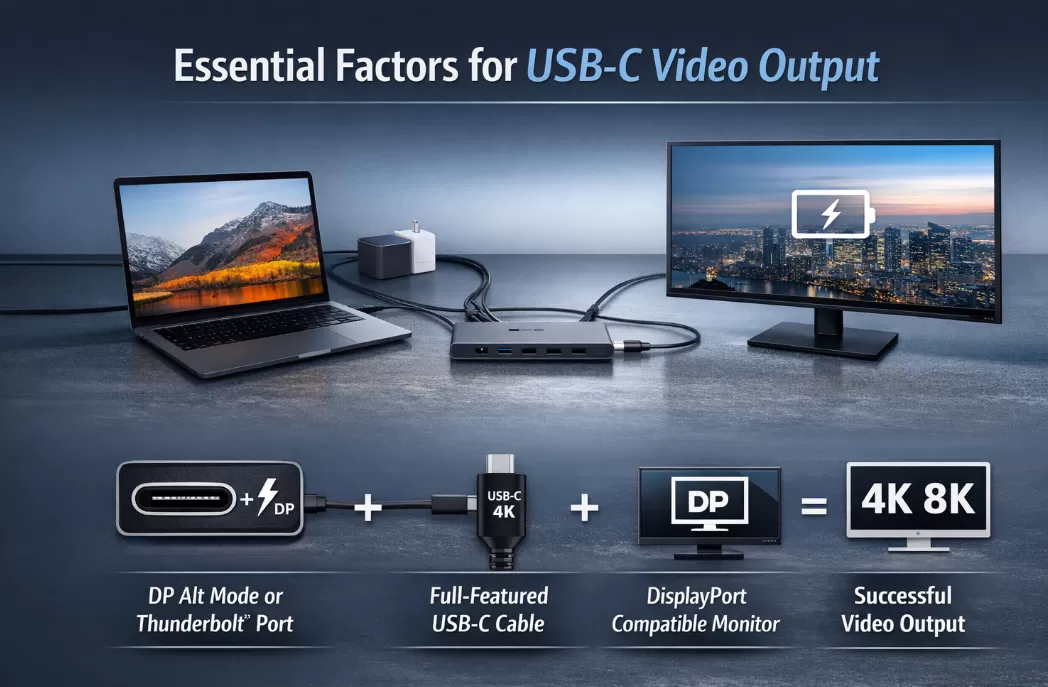
DP Alt Mode is the key technology that enables true single-cable video output over USB-C. Reliable performance depends on three equally important factors:
A USB-C port with DP Alt Mode or Thunderbolt support
A full-featured, video-capable USB-C cable
A display that accepts DisplayPort input
If any one of these elements is missing, video output will fail—regardless of how similar the USB-C ports may look.